Spin the Wheel Names
12 optionsRandom draw
Classic · Education
Load a class, meeting, or activity roster and pick one visible name at a time. Equal starter weights, Remove winner, and Results support clear low-stakes rounds.
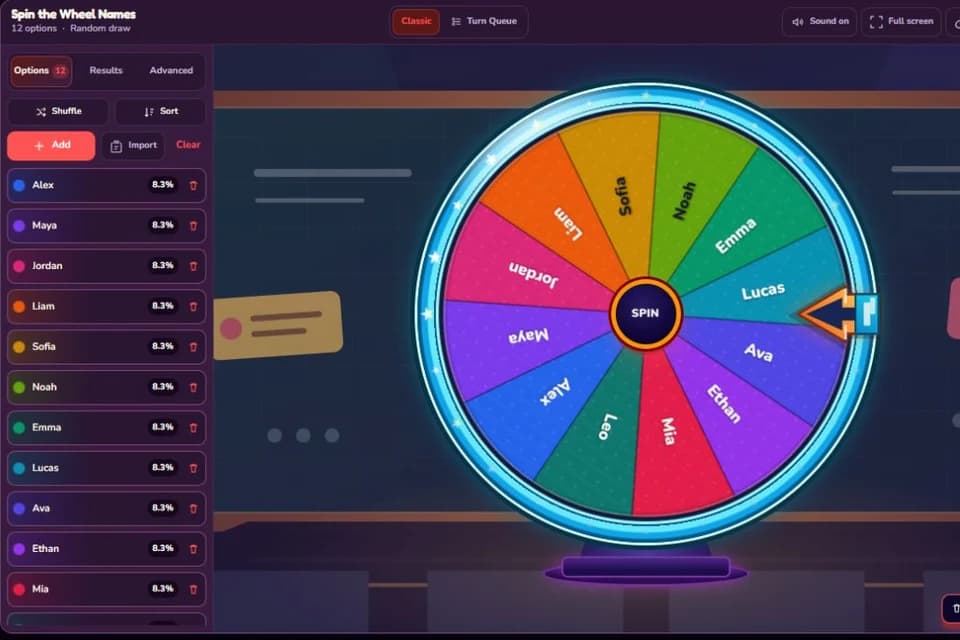
Ready to spin
12 optionsRandom draw
Updated August 14, 2026. The workflow was checked against the current Options, Advanced, Remove winner, Results, sharing, and Excel import controls; the names are fictional examples rather than a real roster. Source: Current Spinanywheel editor behavior and classroom-use review, checked August 14, 2026.
This template answers a narrow question: which visible name should take the next low-stakes turn? It can choose a reader, speaker, volunteer, game participant, presentation order, or meeting facilitator. The twelve names are fictional examples. Replace every one of them before using the wheel with a real group, and decide what the selected person is being asked to do before the first spin.
A random name does not make every activity fair by itself. Participation needs, accessibility arrangements, absences, consent, and the difficulty of the task still belong to the organizer. Use the wheel to choose between eligible names after those decisions have been made.
Open Options on the left, select Import, and paste one display name per line. You can also type names individually or import one column from an Excel workbook. The current editor accepts up to 100 options, keeps labels to 36 characters, and reads .xlsx or .xls files up to 5 MB. Import only the name column; emails, student numbers, attendance notes, and private accommodations do not belong on a public wheel.
All starter names have a weight of 1. With twelve names, each begins at about 8.3% of the total. Advanced shows the stored weight and displayed percentage for every item. If one name has weight 2 while the other eleven stay at 1, that person has two shares out of thirteen—not a 2% chance.
Changing weights can be appropriate only when the rule is stated and understood, such as giving a volunteer pool extra entries by agreement. It should not be used quietly to target or avoid a participant. If the group expects equal selection, leave every weight at 1 and show the percentages before spinning.
Turn Remove winner off when the same person can reasonably be selected again in a later independent round. This can suit a casual game where every spin starts from the full group.
Leave Remove winner on for a presentation order, reading round, or activity in which every eligible person should appear once before anyone repeats. A selected name leaves the wheel, so the remaining percentages update after each result. Start a fresh session when the whole group becomes eligible again.
Explain the task, show the eligible names, confirm the repeat rule, and give everyone thinking time before the spin. After the result, say the name once and allow a short transition rather than treating the animation as pressure. If a student has an agreed opt-out or alternative participation plan, apply it before the wheel is loaded—not after their name appears.
For a full speaking order, keep Remove winner on and continue until the list is empty. For one answer, stop after the first result. Re-spinning because the chosen person is inconvenient undermines the published rule; correct the eligibility list first if someone should not have been included.
If you need a planned list of roles as well as a list of people, switch to Turn Queue: put people in Options and roles or time slots in Queue. Classic remains clearer when every spin answers the same “who goes next?” question.
Results shows the selected sequence and View all rounds opens the fuller session history. CSV export can preserve the order for an informal activity. It does not prove attendance, participation quality, consent, or grading evidence. Check official records separately and do not publish a results file that exposes names without a valid reason.
The complete eligible list and each displayed percentage stay visible, unlike a hidden draw from a private spreadsheet. Remove winner supports a no-repeat round, Advanced reveals any unequal weights, Results records the sequence, and Excel import avoids retyping a prepared roster. You can also adjust contrast, pointer position, stage, sound, and timing for the room without changing the names themselves.
For a complete walkthrough of Options, Excel import, Advanced, sharing, and Results, read How to Use Spin the Wheel. The picker is designed for transparent, low-stakes participation—not grading, discipline, employment, medical, legal, or other decisions that require human judgment.
Tell me what should go on the wheel, which mode it needs, and how you would use it.