Color Spin The Wheel
12 optionsRandom draw
Classic · Creative
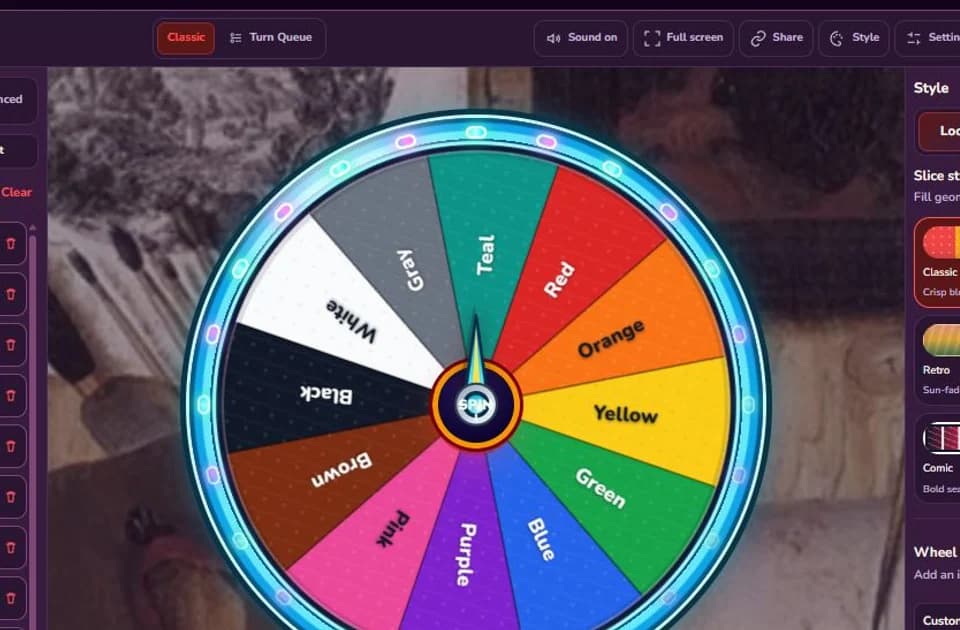
Spin twelve familiar colors for an art prompt, craft choice, team label, game rule, or palette constraint. Every starter slice uses the color named on it.
Ready to spin
12 optionsRandom draw
Updated August 12, 2026. Each of the 12 color names was compared with its slice fill and label color, then the no-repeat palette workflow was checked in Results. Source: editorial basic-color set, checked August 12, 2026.
The preset uses twelve familiar labels: Red, Orange, Yellow, Green, Blue, Purple, Pink, Brown, Black, White, Gray, and Teal. Each slice background matches its label, with a contrasting text color chosen for legibility. This is intentionally a simple vocabulary set. It is not a calibrated color space, a paint catalogue, or a replacement for an eyedropper.
A random color works best when it controls one clearly named part of an activity: the dominant color in a sketch, the material for the next craft step, a team token, a lighting cue, or a game rule. Decide whether nearby shades count before spinning. If Blue wins, does navy qualify? If Red wins, is burgundy acceptable? A short house rule stops players from stretching a label only after they see the result.
Turn Remove winner on and spin four times. Assign the results in order to background, primary, secondary, and accent. Results preserves that order, so the same four colors do not quietly swap roles later. The outcome may be awkward—and that is the creative challenge. Randomness supplies a starting constraint, not proof that the palette is harmonious.
Try this drawing rule: 60% background color, 30% primary color, and 10% accent color. Keep the fourth result for outlines or highlights.
For younger players, remove labels they do not yet distinguish. For advanced art work, replace the starter set with project-specific pigment names or hex values.
Typing “#1D4ED8” without changing the slice background leaves a misleading visual. Conversely, screen color can vary with displays, projectors, profiles, and room lighting, so record an exact brand or print value somewhere outside the wheel when precision matters.
Do not rely on color alone for safety instructions, teams, status, or interface meaning. Keep text labels visible, and test the final combination with a dedicated contrast checker and color-vision simulator. Black and White being present on this wheel does not guarantee that every randomly generated pair has sufficient contrast.
Unlike a text-only picker, the selected options are visible as colored slices, and Advanced keeps per-slice text color and artwork editable. Remove winner can create a non-repeating palette; Results preserves the role order; Share and Full screen help a class or remote group use the same setup. It is a transparent prompt generator whose twelve starting choices can be inspected before anyone spins.
Tell me what should go on the wheel, which mode it needs, and how you would use it.